- How old is my phone? (iPhone, Samsung & Android)
- 1) Release date: “how old is my phone model?”
- 2) Manufacturing date (MFD): what’s changed recently
- Samsung & other Android brands
- 3) Purchase date: the one warranties usually use
- 4) Activation date: when your phone first went live
- Get a Quote for your Old Phone
- Final Thoughts
- Quick FAQs
How old is my phone? (iPhone, Samsung & Android)
If you’ve been asking, “how old is my phone?”, you’re not alone. Age affects resale price, battery health, software support and warranty—yet the info isn’t always obvious. That’s frustrating when you’re trying to sell, claim a repair, or just check if it’s upgrade time.
Your phone’s “age” can actually be measured in four different ways:
- Release Date – When the model first launched.
- Manufacturing Date (MFD) – When your specific device was built.
- Purchase Date – When you bought it (usually tied to warranty).
- Activation Date – When it was first set up with a SIM card.
This guide explains the four “ages” of a phone and shows simple, reliable ways to find each on iPhone, Samsung and Android. We’ve kept it practical and fully up to date. And if you decide it’s time to switch, The Big Phone Store can value or refurbish your device with expert care.
1) Release date: “how old is my phone model?”
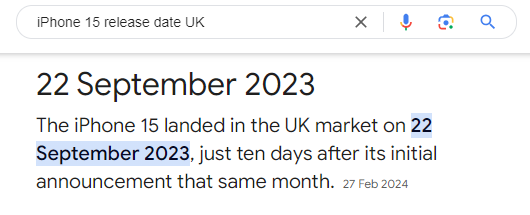
Search the exact model name + “release date” (e.g. “Galaxy S23 Ultra release date UK”).
Check official brand pages or trusted tech sites.
This is model-level age; your specific device may be newer.
| Term | What it means | Why it matters | Where you’ll usually find it |
|---|---|---|---|
| Release Date | When the model first launched | Tells you how modern the tech is and typical software support window | Online model pages / tech press |
| Manufacturing Date (MFD) | When your specific handset was built | Useful for batch fixes, rough longevity | Box label, service menus (varies) |
| Purchase Date | When you bought it | Starts most retailer warranties & consumer rights | Receipt, order history, carrier bill |
| Activation Date | First time the phone was set up on a network | Used by some brands to start coverage | Brand coverage tools, carrier records |
2) Manufacturing date (MFD): what’s changed recently
iPhone (important update)
Since early 2021, Apple moved to randomised serial numbers, so the serial no longer encodes production year/week. Use Apple’s official coverage tools instead if you need activation/warranty timing.
Where to look now
Settings → General → About → Serial Number (for reference only; not decodable for age on newer models).
Settings → General → AppleCare & Warranty to view coverage status.
Apple Check Coverage site to confirm warranty/activation once you enter the serial.
Older, pre-2021 iPhones used structured serials that could reveal year/week, but don’t rely on this for recent devices.
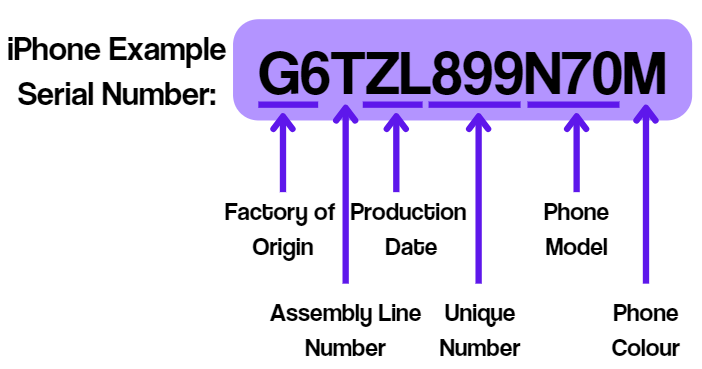
Go to Settings > General > About > Serial Number.
- 1st–3rd characters → Factory and country.
- 4th character → Year/half-year of production.
- 5th character → Week of the year.
Example: “D” = 1st half of 2011, “F” = 2nd half of 2011.
👉 Quick tip: Enter your iPhone serial number into Apple’s coverage checker for production and warranty info.
Samsung & other Android brands
Formats vary. Samsung doesn’t publish a universal serial “decoder”, and schemes can change by factory and year. Prior advice like “4th character = year, 5th = month” isn’t dependable across all models.
Better options:
Settings → About phone (often shows build / firmware dates).
Dial
*#06#to display IMEI/serial; sometimes service menus expose “Manufacture date” on certain devices/models—but these codes don’t work on every phone.Box label: many Android phones print MFD near the barcodes.
Caution: Third-party IMEI “age checkers” exist; results can be inconsistent and you may share personal identifiers. Always use official settings and tools!

3) Purchase date: the one warranties usually use
Receipt or invoice (email or paper) is your source of truth.
Brand accounts (Apple ID, Samsung Account) may show devices and coverage, which helps estimate start dates.
Carrier contracts also show when your plan/handset started.
At The Big Phone Store, warranties start from your purchase date. Most devices include a 12-month warranty (often extendable to 24 months). While this may not indicate release date, it’s always useful to see what coverage you’ve got.
4) Activation date: when your phone first went live
iPhone: Apple’s Check Coverage uses your serial to show if coverage is active, which correlates with activation. In iOS you can also see warranty info under AppleCare & Warranty.
Samsung/Android: Some service menus or carrier records show first-use dates, but availability varies by model and network.
Get a Quote for your Old Phone
You don’t need all four dates to sell your phone. At The Big Phone Store, you can instantly check your phone’s value based on:
- Model name
- Cosmetic condition
- Storage capacity
And thanks to our honesty policy, we pay what we say.

You get:
A Guaranteed Price
Same Day Payment
Forensic Grade Data Wiping
Real Human Support
Selling your phone with us means better value, less hassle, and a greener planet.
Final Thoughts
If you’ve been asking, “How old is my phone?”—you now know how to check via release date, manufacturing date, purchase date, and activation date. This helps you decide if it’s time to upgrade, repair, or sell your device.
👉 Ready to upgrade? Get an instant trade-in quote today and see how much cash you could get for your old phone.
Quick FAQs
Can I check “how old is my phone?” without turning it on?
Yes—look on the box barcode label for MFD, or read the printed serial/IMEI on the device (where present).
Can I get my iPhone’s age from the serial number?Not on modern models. Since 2021, serials are randomised, so use Apple’s coverage tools instead.
Do Android secret codes always work?
No. Service menus and codes vary by brand, model and region; many are disabled on carrier devices. Use Settings and official tools first.